Batch List charts
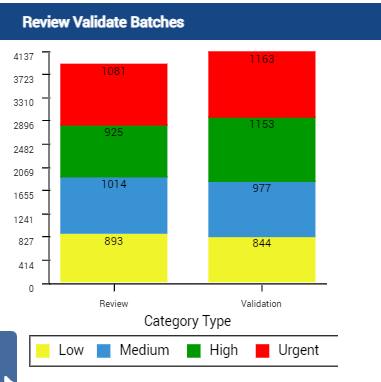
Use the Batch List charts to view a graphical display that shows the number of batch instances in Review and Validation under various priorities.
The charts list the number of batch instances in Ready for Review and Ready for Validation according to their priority: High, Low, Medium, and Urgent.
When you open the Batch List page, a stack chart displays the number of batch instances in review and validation. The stack chart is populated with the dynamic data.
The interactive legend under the chart helps to identify priority. Each priority is represented by its own color. When you hover on any priority in the chart, the corresponding data set is highlighted.
Order and color
In the Batch List chart, the first bar shows the batches in the Review state and the second bar shows the batches in the Validation state.
For both bars, the yellow segment represents low priority batches. The blue segment is for medium priority batches. The green segment is for high priority batches. The red segment is for urgent priority batches.