
Kofax VRS Test Console Window
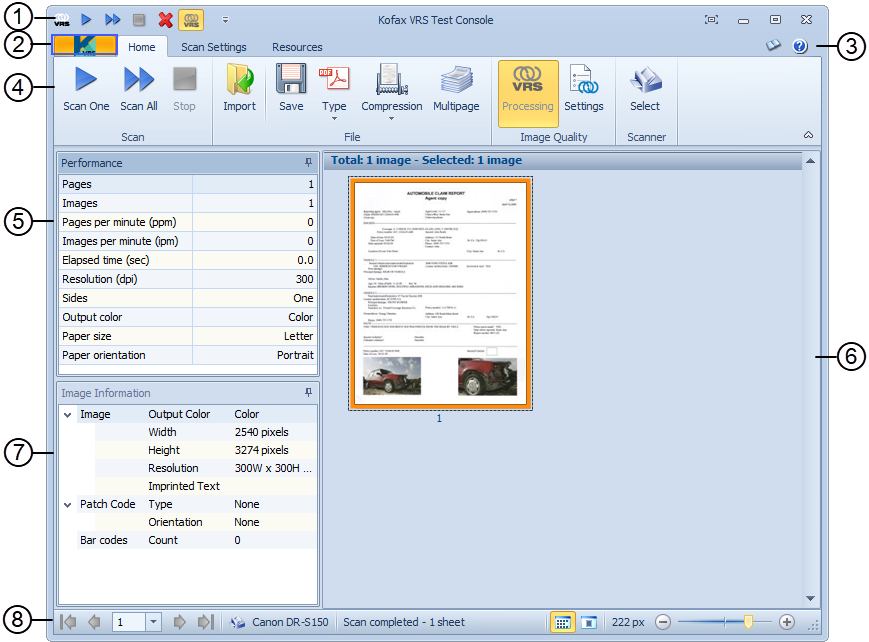
The following figure shows the Kofax VRS Test Console window. For more information about the user interface, click the text links below the image.
| Callout | Feature |
|---|---|
| 1. | Quick Access toolbar: Shortcuts to frequently used VRS controls. |
| 2. | Kofax Button: Opens and closes the Kofax menu on the Kofax VRS Interactive Viewer. |
| 3. | Support Group: Access help and view product version information. |
| 4. | Ribbon: Groups of scanning settings, arranged under three tabs: Home tab, Scan Settings tab, and Resources tab. |
| 5. | Performance panel: Displays real-time statistics related to each scan operation. |
| 6. | Viewer: Displays images as they are scanned. |
| 7. | Image Information Panel: Displays real-time statistics related to the image selected in the Viewer. |
| 8. | Status Bar Controls: Select an image viewing mode and adjust the way images appear in the Viewer. |