
Boolean operators
Commonly used Boolean operators
-
AND (&): Insert between two words to find only documents that contain both words. This narrows the search, since documents containing only one of the words will not be found.
-
OR ( | ): Insert between two words to find all documents containing either word. This gives a wider search, since more documents are likely to fulfill this condition. Documents containing both words will also be found.
-
EXCLUSIVE OR (^): Insert between two words to find all documents containing either word, but not containing both.
-
NOT (~): Insert before a search word to exclude all documents that contain the word. You can combine this with a positive search request, for example: type
Invoice NOT Kofax
to find all documents that contain the word Invoice but do not contain the word Kofax. -
Use parentheses to specify the order of operations. For example, type:
Europe & (Paris | Brussels)First, there is an OR search on
Paris
andBrussels
, and then an AND search on the result withEurope
. So it finds all documents with eitherParis
orBrussels
, but then retains only those that also containEurope
.
In the following examples, A and B represent search words or strings. The green area in the diagrams shows which occurrences are found.
| Operator | Symbol | Examples | Diagram |
| AND | & |
A AND B A & B |
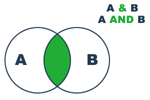 |
| OR | | |
A OR B A | B |
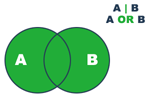 |
| EXCLUSIVE OR | ^ |
A EXCLUSIVE OR B A ^ B |
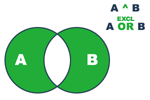 |
| NOT (alone) | ~ | NOT A ~ A |  1 |
| NOT (combined) | ~ |
A NOT B A ~ B |
 |