
Index fields
Folder Index Fields and Document Index Fields display indexed data of captured images. The size and content of the fields are specific to the capture profile or the project. Index data can be entered or edited at this time if Index Data Editing is enabled. When OCR-assisted indexing is enabled, the results are automatically filled in.
Multi-record indexing
At times, a batch/folder/document can have multiple index records, indicated by "Record X of Y" as shown in the image below. These records can be user-generated, or can result from returns after a database query. If multiple records are found while performing a database lookup, you can configure PSIcapture to automatically return the first matching record, display a list for you to select from, or create a new document record for each record returned.
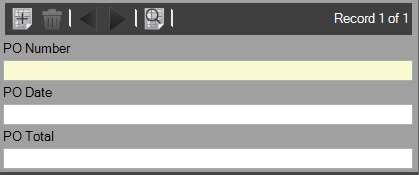
Multi-record indexing toolbar
| Button | Description |
|---|---|

|
Adds a record to a document. |

|
Deletes a record from a document. |

|
Navigates through document records using the left or right arrows. |

|
Lists all records for a document in a new dialog box. |

Index fields used as a key for database lookup have a
 refresh icon next to them. Click the icon to initiate a lookup
based on the data entered in the field. This refresh option is useful if any changes were made to the lookup source.
refresh icon next to them. Click the icon to initiate a lookup
based on the data entered in the field. This refresh option is useful if any changes were made to the lookup source.
Enable Allow multiple records per document (in ) to process multi-record indexing.