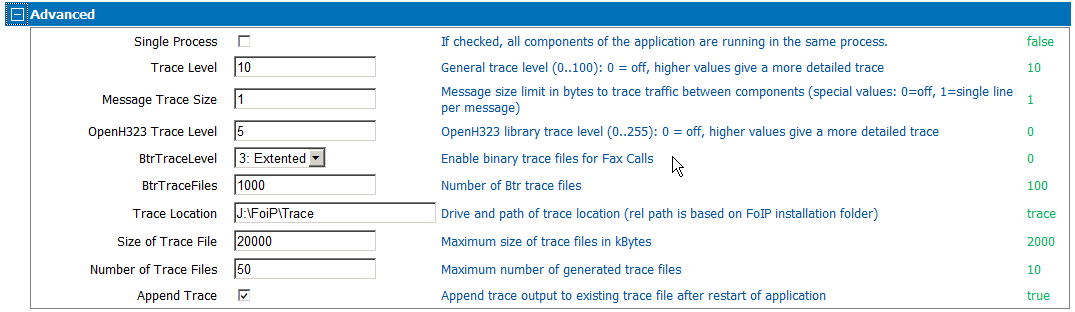
Advanced Tab
- SingleProcess
-
If selected, all components of the application are running in the same process.
- Trace Level
-
General trace level:
- 0 = Off
- 10 = Very rare tracing that happens only during initialization / startup.
- 20 = Few trace data per document. Less trace output with productive systems.
- 30 = More intense tracing. Productive use is possible but trace files can be large.
- 60 = Restricted performance for productive use (max. 10 channels recommended).
- 100 = Extensive tracing for troubleshooting. Operating multiple channels can fail.
- More than 100 = Reserved for third level support.
- Message Trace Size
-
Message size limit in bytes to trace traffic between components:
- 0 = Off
- 1 = Single line per message
- More than 1 = size limit in bytes
- OpenH323 Trace Level
- Specify the OpenH323 library trace level (0..255). Set to 0 to turn off traces. Higher value results in more detailed traces.
- BtrTraceLevel
- Enable binary trace files for fax calls.
- BtrTraceFiles
- Specify the number of Btr trace files.
- Trace Location
- Specify the drive and path of trace location. If you are using relative paths, they are based on FoIP installation folder.
- Size of Trace File
- Specify the maximum size of trace files in KB.
- Number of Trace Files
- Specify the maximum number of generated trace files.
- Append Trace
- Select to append traces to existing file after a restart of the application.