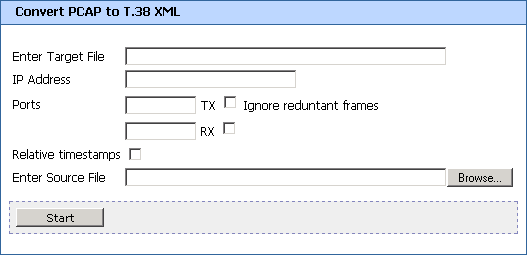
Convert PCAP to T.38 XML Window
This page appears when you select from the Development Tools menu. Use this page if you want to convert a PCAP file to a T.38 file.
- Enter Target File
- Enter the name of the destination XML file.
- IP Address
- Specify the IP address of the one party of the fax session that you want to focus on.
- Ports
- Enter the port numbers for transmitting (TX) and receiving (RX). By entering only one of these ports, you can limit your XML file to either transmitted data or received data.
- Ignore redundant frames
- Select to omit repeating frames from the fax session.
- Relative timestamps
- By default, the time stamps assigned to frames show absolute time, i.e., how much time occurred since the first frame. Selecting this check box switches to relative time stamps, i.e., how much time occurred since the previous frame. (This allows simple changes in the order of the frames.)
- Enter Source File
- Enter the name of the source PCAP file. This file may only contain T.38 UDP packets
- Browse button
- Click to locate the source file.
- Start button
- Click to start the conversion.