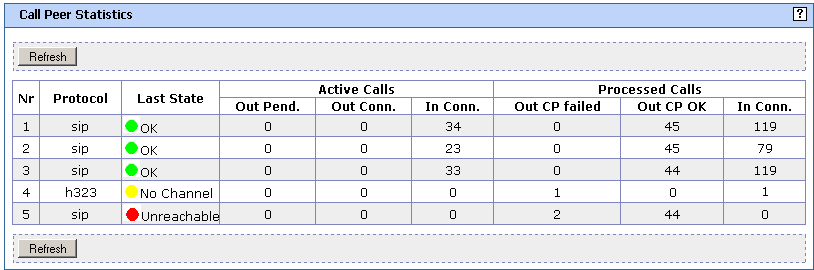
Call Peer Statistics Window
This page appears when you select from the Fax over IP menu. Use this page to view the statistics of calls on each of the configured call peer.
- Refresh button
- Click to update the values on the screen.
- Nr column
- Column showing the number of the call peer as configured in FoIP configuration. Only enabled call peers are listed.
- Protocol column
- Column showing the protocol of the call peer, such as SIP or H.323.
- Last State column
-
Column showing the last known state of the call peer:
- Unknown (white): Call peer has not been used yet
- OK (green): Last call via the call peer has been successful
- No Channel (yellow): In the last call attempt, the call peer was online but it had no free channels
- Unreachable (red): Call peer unreachable, such as network down
- Active Calls column
- Column showing the number of active calls: outgoing pending (such as alerting the called party), outgoing connected, and incoming connected.
- Processed Calls column
- Column showing the number of processed calls: outgoing failed (such as calls that failed to connect), outgoing OK, and incoming OK.