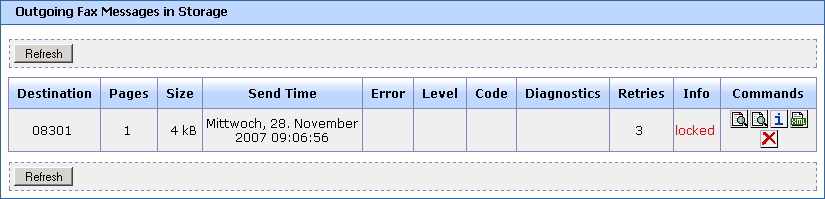
Outgoing Fax Messages in Storage Window
This page appears when you select from the Fax over IP menu. Use this page to view messages that are queued for sending or are currently being sent.
- Refresh button
- Click to update the values on the screen.
- Destination
- The fax number of the called subscriber.
- Pages
- Number of pages of a fax message.
- Size
- Size of the fax message.
- Send Time
- Date and time when FoIP started sending the message.
- Error
- Shows OK or a simple error cause.
- Code
- A more detailed error code (not yet defined).
- Diagnostics
- Additional information about an error.
- Retries
- Shows how many retry attempts are left.
- Info
- Status of a message (locked / deleted / neither)
- Commands
-
Use these commands for managing the message:
- Click
 to display the content of the fax (including header line) in a TIFF viewer or to save the fax in
TIFF format.
to display the content of the fax (including header line) in a TIFF viewer or to save the fax in
TIFF format.
- Click
 to display the content of the fax in a TIFF viewer or to save the fax in TIFF format.
- Click
 to display additional information about a message.
- Click
 to display the source of the message in XML format.
- Click
 to delete the fax from the storage.
- Click