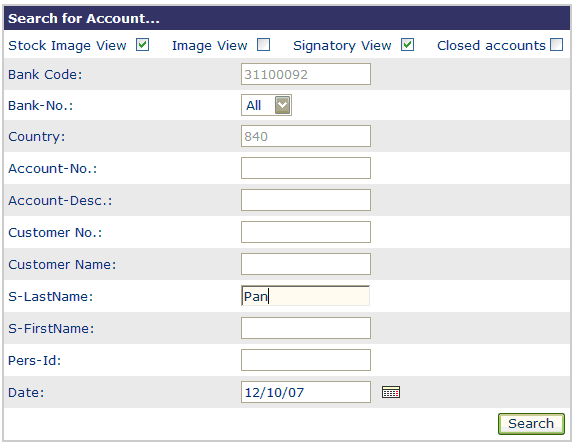
Search account
The following data for the account being sought are entered in this dialog:
- Country
invariable default (as adjusted by the system administrator)
- BNO
default value may be changed by selecting a pulldown-menu’s item
- Bank code
invariable default (as adjusted by the system administrator)
Further on, the search requires one of the following information:
- Customer No.
Produces a list of present accounts
- Account No.
Produces a list with all customers having a corresponding account.
- Customer No and Account No
The corresponding account view is directly displayed.
- Customer Name
Produces a list of corresponding customers with all their accounts.
- Account Description
Produces a list of all corresponding accounts, together with their customer number and bank codes.
- Signatory Last name or Signatory Last name in connection with
Signatory First name
The entry produces a list of fitting customers having a signatory with this name and all their accounts.
- Personal ID
The entry produces a list of fitting customers having a signatory with this ID and all their accounts.