
View on documents
The organization can have hundreds of different documents such as letters, policies, offers, invoices, and many others. A document consists of various elements, such as the address, salutation, body of a letter, and closing. A document can also have a corporate identity that includes a logo, footer, standard font, custom margins, and so on.
Typically, the organization has a number of similar documents. For example, all letters in the organization may have the same layout, headers and footers, address block, and salutation.
In KCM Designer you can manage all these elements correctly and easily in an individual way. Document production in KCM Designer is template-based. Various document elements, such as blocks of text (so-called Text Blocks), or a corporate footer, can be created and adjusted individually. Changes have to be applied only once.
KCM Designer is role-based. Changes in certain document elements, such as those related to the corporate identity, can only be applied by a user whose role is to manage the corporate identity.
Working with separate document elements makes it possible to easily apply multi-branding. Content elements, such as Text Blocks, can be reused by sub-brands, if their corporate identities differ.
The following figure reproduces the structure of a letter with various elements.
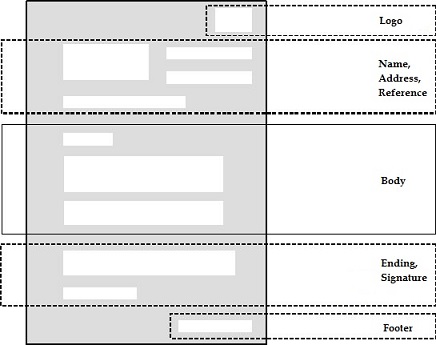
The logo, name, address, reference, ending, signature, and footer might be identical with each letter. In KCM Designer, these elements are defined in Master Templates.
The body might differ in each letter. It is defined in Content Wizards and Text Blocks. Content Wizards and Text Blocks are linked to Master Templates using Document Templates.
Styling elements of a document, such as fonts, margins, and more, are defined in Corporate Design. For more information, see Work with Corporate Design.