Exceptions
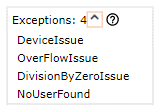
Use the Exceptions area in the Robot definitions pane to view a list of exceptions that a robot might throw and that are returned to the caller robot as an error. See Edit Robot for navigation and context-menu options.
When a Robot encounters an error during execution, an exception is thrown and the execution may pause because of the error. Exceptions inform you that something unexpected happened.
The error message provides a description of the error and button options for navigating to the error, continuing the execution, or cancelling the execution.
-
To find where the exception is thrown in a Robot, right-click the exception and select Find Usage.
The Search Result panel shows which steps and/or finders threw the issue.
-
If an exception is not handled within a called robot, it propagates to the calling robot and appears in the calling robot's list of exceptions.
-
When stepping over a Call Robot step, if an unhandled exception occurs in the called robot, the called robot's editor automatically opens and navigates to the flow-point where the error occurred.
-
For called robots, see also Execution view.
In some cases, exceptions can be handled by the Try Catch step (Robots) or the Try step (Basic Engine Robots) and the robot execution may continue afterwards.
-
If the calling robot catches the exception using a Try Catch or Try step, you have the option to either navigate to the location of the error or continue the execution.
-
In situations when the robot is not configured to handle an exception, the execution stops without an option to continue. Opens to the location of the error even if it's within a called robot.
-
When called on the Management Console, the error is written to a log.
-
When called by a web service, the error is shown in the returned JSON or XML.
In this example, the robot throws four exceptions: three predefined exceptions (DeviceIssue, OverFlowIssue, and DivisionByZeroIssue) and one custom exception (NoUserFound). The list of exceptions cannot be edited and only provides information about the robot.