
Dot removal
Using this filter you can find and remove dots, specks and blobs of various sizes in 1-bit documents. The dots, specks, and blobs may or may not be all black.
Prior to configuration, set appropriate Measure unit (one thousandth of an inch or pixels).
You can set minimum and maximum size of objects to be removed through Minimum/Maximum dot Width and Height input boxes. If you clear the Use Dot Sizes check box, the default values will be used.
You can switch on/off the use of Diagonals in search of spots to be removed.
This option allows you to treat the pixels that are diagonal as part of the dot or not. Consider the "speck" below consisting of nine pixels.
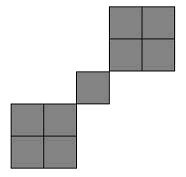
If Use Diagonals box is checked, this speck is considered a single dot that is 5x5 pixels. If Use Diagonals box is unchecked, the speck is considered three separate dots (2x2, 1x1, 2x2).
You set all dot size parameters or rely on the defaults provided and preview the results in the viewport at the top of the dialog box using different colors for indication of white and black regions at the output. To display changes in the resulting image, check Show Changes as Color Selection box and pick the colors in the Color Picker dialog that opens by click on Black Area and White Area buttons at the bottom of the dialog.