
Roles
User roles are a way to control what users can and cannot do in the portal.
The roles that can be assigned to a user depend on the type of the user - supplier user or buyer admin user. Supplier users are the users who work with invoices and purchase orders. Buyer admin users are the administrative users that interact with the supplier users in the portal. They are not necessarily people in purchasing or procurement roles. Most of the time, a buyer admin user is a person in the Accounts Payable department.
For details about the roles available for the corresponding user type, see Supplier user roles and Buyer admin roles. The role assigned to a buyer admin user also determines the privileges of the corresponding user. For more information, see Privileges.
The actions that a user with a specific role is allowed to perform depend on the administrative level of the corresponding role - the higher the level, the more actions a user is allowed to perform. The following administrative levels are applicable for the different user roles.
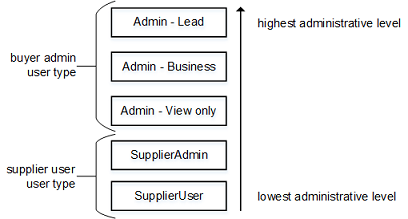
The role of existing users can be changed, as long as the new role belongs to the same user type. For example, an Admin - View only user can get the Admin - Business role assigned, but not the SupplierAdmin role.