
Toolbar
The toolbar on the left is used to access the TC/Web tools and other functionalities, such as to compose a message. All of the tools can be configured to be displayed or not.
Brief description of each tool:
| New Message | Compose a new message |
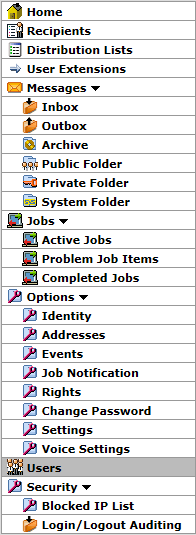
Picture 11: Toolbar |
| New Job | Compose a new broadcast job (TC/Broadcast only) | |
| Home | Start page showing My Actions | |
| Recipients | Create and edit recipients and their addresses | |
| Distribution Lists | Create and edit distribution lists and select which recipients they contain | |
| User Extensions | Configure which (phone/fax/…) extensions are routed to which user | |
| Messages | ||
| Inbox | View incoming messages | |
| Outbox | View sent messages | |
| Archive | View archived incoming and sent messages | |
| Archive1-3 | Additional views for archived incoming and sent messages | |
| Public | View public folder (formally known as FIS folder) | |
| Private | View private folder (formally known as Message folder) | |
| System | View the system folder | |
| Jobs (TC/Broadcast only) | ||
| Active Jobs | View the currently active broadcast jobs | |
| Problem Job Items | View the broadcast job orders that could not be sent | |
| Completed Jobs | View the completed broadcast jobs | |
| Options | ||
| Identity | Edit the User Profile settings of the current user | |
| Addresses | Edit addresses for the current user | |
| Events | Edit events for the current user | |
| Change Password | Change password of the current user | |
| Settings | TC/Web settings for the current user | |
| Job Notification | Edit job notification options (TC/Broadcast only) | |
| Voice Settings | Voice settings for the current user | |
| Users | List of all users in the system | |
| Security | ||
| Blocked IP List | List of IP addresses with blocked access to TC/Web | |
| Login/Logout Auditing | View the Login/Logout Auditing | |
| Logout | Log out the current user | |