
Integrate TotalAgility with Generative AI
Use the following procedure to integrate TotalAgility with Generative AI.
You can add more than one integration for Generative AI providers.
-
Navigate to
.
The Generative AI providers page appears. By default, the Tungsten AI provider is available. You can use this AI provider or configure other Generative AI providers supported by TotalAgility.
-
Click
New to configure other Generative AI providers.
The New AI provider configuration dialog box is displayed.
-
On the
Type list, select one of the AI providers and configure it to use as a
Standard or Vision model.
Configure the standard model settings when you make use of an AI provider and do not use an image to generate an item.
Configure the vision model settings when you make use of an AI provider and use an image to generate an item. If the vision settings are not configured or the model specified does not support the use of images, an error appears.
-
ChatGPT OpenAI (default)
Configuration settings
Description
ID Provide a unique ID for the AI provider.
Display name Enter the AI provider name to help in identifying the server's name in the list.
Use legacy function syntax The "function" syntax used by TotalAgility to send the request to the AI provider. If you clear the check box, TotalAgility makes use of the latest "tools" function syntax to send the request.
When you execute Copilot or a Generative AI Activity or a Generative AI action using Data objects, the legacy or latest function syntax is used depending on the setting configured. If the model does not support the syntax, an error occurs.
Use provider as Copilot for development
If selected, the AI provider is used as the Copilot for development. (Default: Clear)
You can have multiple AI providers but use only one AI provider (ChatGPT OpenAI or Azure OpenAI) as the Copilot for development.Copilot for extraction
If selected, the AI provider is used as an Extraction provider. (Default: Clear)
When multiple AI providers are configured, you can use only one AI provider (ChatGPT OpenAI or Azure OpenAI) as Copilot for data extraction.
Standard Model: Use this model when generating an item using an AI provider and not an image. API URL Enter the API URL for the selected provider.
Authentication Select the authentication type:
-
API key: Enter the API key. This key is used for authentication/authorization.
-
OAuth: Select the OAuth server configured in TotalAgility. See Configure OAuth server.
At runtime, when calling an AI provider using an OAuth server, the access token is automatically retrieved and included in the Authorization header. Additionally, the access token is automatically refreshed based on the refresh interval set in the OAuth Server.
Use custom API key header If selected, allows you to specify a API key header name for API key authentication; otherwise, the default API key header name is used. (Default: Clear)
API key The API key for the Generative AI provider. The supported API key version is 2024-10-21.
The maximum supported length for the API key is 2,000 characters.
Model Enter the AI provider model such as gpt-3.5-turbo, to align with your requirement.
Temperature Set the process Temperature for the AI provider. (Default: 0.5, Minimum value: 0, and Maximum value: 2)
Temperature is a parameter that controls the level of creativity in the AI-generated text. You get a more focused or diverse text based on the temperature set. A higher temperature means the model takes more risks, giving you a mixed response.
Timeout in seconds Configure the timeout period in seconds for the provider. (Default: 300, minimum: 120, and maximum: 3600)
When you send a request to an AI model, such as a text generation or image processing task, the timeout period ensures the request does not become unresponsive indefinitely. This is helpful as some providers are slower than others, and adjusting the timeout period accordingly can optimize performance.
For example, if you set a timeout period of 120 seconds for a text generation request, the system will wait up to 120 seconds for the AI to generate the response. If it takes longer than 120 seconds, the request will be terminated, and an error will be returned.
Retry count Set the retry count for the provider. (Default: 5, minimum: 0 , and maximum: 100)
The retry count is the number of times a system attempts to retry a failed operation before giving up and returning the failure response. If you set a retry count of 3, the system will attempt to resend a failed request up to 3 times before finally returning an error if the request continues to fail.
When you use the AI models, the timeout and retry count settings are applied for Copilot, Copilot for extraction, dashboard insights, Copilot insights, and vision usage.
Vision Model: Use this model when generating an item using an AI provider and an image. An error appears if the vision settings are not configured, or the specified model does not support the use of images. API URL Enter the API URL for the vision model.
Authentication Select the authentication type:
-
API key: Enter the API key. This key is used for authentication/authorization.
-
OAuth: Selected the OAuth server configured in TotalAgility. See Configure OAuth server.
At runtime, when calling an AI provider using an OAuth server, the access token is automatically retrieved and included in the Authorization header, in line with the existing support for OAuth servers in other areas. Additionally, the access token is refreshed automatically based on the refresh interval set in the OAuth Server.
Use custom API key header If selected, allows you to specify a API key header name for API key authentication; otherwise, the default API key header name is used. (Default: Clear)
API key The API key for the Generative AI provider. The supported API key version is 2024-10-21.
The maximum supported length for the API key is 2,000 characters.
Model Optional. Select the AI provider model such as gpt-4-vision-preview, if using an image as the input. However, you can change the model to align with your requirements.
Token limit Set the token limit for the provider, (Default: 3000)
Tokens are word fragments that are generated when the AI provider processes the input. The token limit restricts the number of tokens (usually words) sent to a model per request.
Timeout in seconds Configure the timeout period in seconds for the provider. (Default: 300, minimum: 120, and maximum: 3600)
Retry count Set the retry count for the provider. (Default: 5, minimum: 0 , and maximum: 100)
-
-
Azure OpenAI
The Azure OpenAI provider type has the same configuration options as ChatGPT OpenAI.
You need not set the model for Azure OpenAI provider type, as it is not used by Azure.
-
Custom LLM
Configuration settings
Description
ID Enter an ID for the AI provider.
The system identifies the AI provider with this ID.
Display name Enter the AI provider name to help identify the server's name in the list.
Process Select the custom service or synchronous process that includes the following variables.
Variable name
Variable type
Initialization
Inputs: Document Content
String
Yes
Document Type
String
Yes
Input Prompt
String
Yes
Seed
Short
Yes
Temperature
Double
Yes
Use seed
Bool
Yes
Document
Document
Yes
Outputs: Output
String
No
Error Raised
Bool
No
Status Code
Short
No
Error Message
String
No
If the required process is not available, click the Create new process link to automatically create a synchronous process with the correct input and output variables. The process appears on the business processes list page and the variables are initialized in the following order.
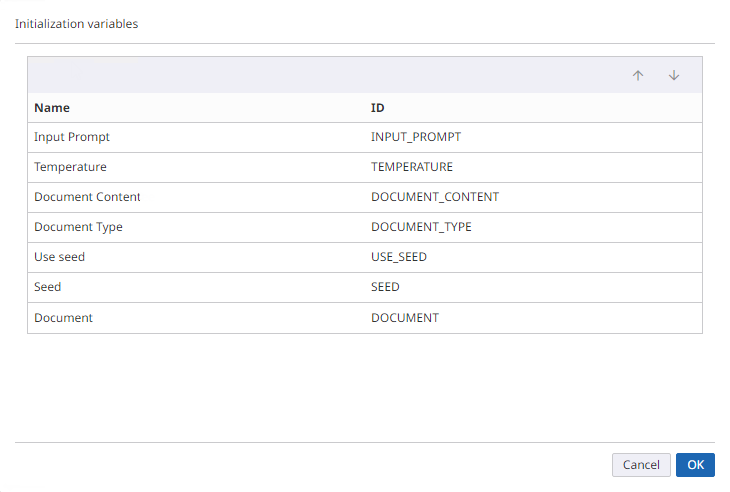
When a TotalAgility document is used, the Document variable is initialized with the instance ID of the document at runtime. When a form is configured with the Generative AI Chat control or Copilot using AI Agent as the provider and Inline image as source, then the Document Content variable is initialized with base64 string of that image.
-
You can change the name of the variables if the initialization order is unchanged.
-
You cannot delete a process if it is configured as a custom LLM AI provider.
-
-
AI Agent
The AI Agent provider type has the same configuration options as Custom LLM.
-
-
Click
Save.
The configured AI provider appears on the Generative AI providers page. You can update or delete an existing Generative AI provider.When you open the existing AI provider, the API key is encrypted, and only the last five digits of the key are displayed.
Tungsten AI provider
The "Tungsten" AI provider is an out-of-the-box AI provider for use with "Copilot for development" and "Copilot for extraction". Additionally, the Tungsten provider supports the use of images.
The user's license is validated when using Copilot with the Tungsten AI provider to generate an item or a Generative AI activity, form action, or chat control. If the license is valid, the user's token allowance is deducted based on the prompt. One token volume unit equals 100 tokens.
The Tungsten AI provider is available by default with TotalAgility 2025.2. It includes the following settings:
|
Configuration settings |
Description |
||||
|---|---|---|---|---|---|
|
ID |
Read-only field. |
||||
|
Display name |
Read-only field. |
||||
| Use provider as |
|
||||
| Temperature |
Set the process Temperature for the AI provider to control the level of creativity in the AI-generated text. (Default: 0.5, Minimum value: 0, and Maximum value: 2) |
||||
| Timeout in seconds |
Configure the timeout period in seconds for the provider so the request does not become unresponsive indefinitely. (Default: 300, minimum: 120, and maximum: 3600) |
||||
| Retry count |
Set the retry count for the Tungsten AI provider. (Default: 5, minimum: 0, and maximum: 100) |
||||
| Vision timeout in seconds |
Configure the vision timeout period in seconds for the provider. (Default: 300, minimum: 120, and maximum: 3600) |
||||
| Vision retry count |
Set the vision retry count for the provider. (Default: 5, minimum: 0, and maximum: 100) |
||||
| Token limit |
By default, the token limit for the Tungsten AI provider is 3000. |
The Temperature, Timeout in seconds, Retry count, Vision timeout in seconds, and Vision retry count configuration settings are not applicable when the Tungsten AI provider is used as Copilot for extraction.
On upgrading to TotalAgility 2025.2, the Tungsten AI provider is available by default for using "Copilot for development" and "Copilot for extraction," but with the following exceptions:
-
If no provider was previously set to "Use for Development" or "Use for Extraction," the Tungsten AI provider will have both options set to true.
-
If a provider was previously set to "Use for Development," the Tungsten AI provider will have "Use for Development" set to false, while the existing provider configuration remains unchanged.
-
If a provider was previously set to "Use for Extraction," the Tungsten AI provider will have "Use for Extraction" set to false, while the existing provider configuration remains unchanged.