
Document pre-loading example
The "Enable document pre-loading" system setting (available under System › System settings › System › Forms) determines how documents are loaded in a Capture Client activity.
For example, consider a batch of 20 single-paged documents. No custom actions are configured when loading the Capture Client form.
When "Enable document pre-loading" is set to false
The calls (as shown in the image below) are available in an HTTP trace when loading the Capture Client form. The calls highlighted in red are made synchronously when loading the form while the remaining calls are made asynchronously in the background.
The GetImage() call retrieves the image for the currently selected document and page. A GetThumbnail() call is made to
retrieve the thumbnail of the first page for the remaining documents in the batch. Loading the image of the first page and all page
thumbnails in the background allows optimal response times when loading the form.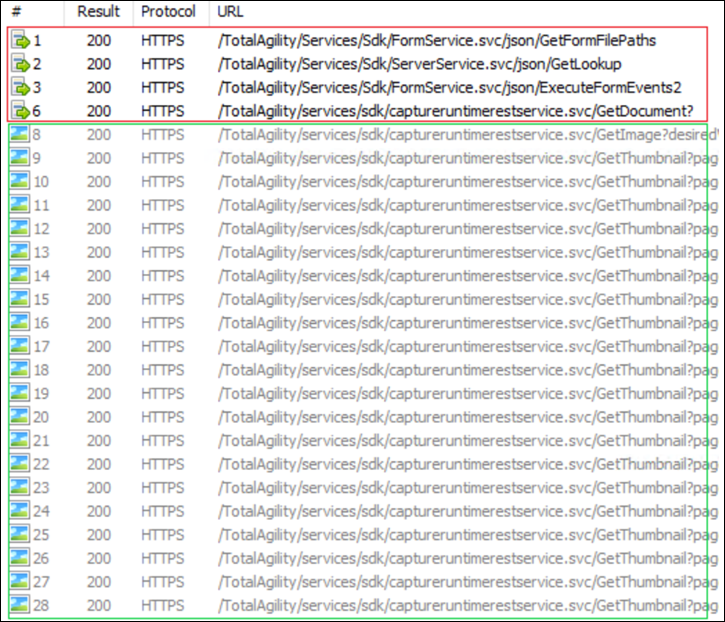
When navigating to another document in the batch, the document is loaded on demand, and the corresponding GetDocument()
call is available in an HTTP trace as shown in the following image. A GetImage() call is also made to retrieve the currently
selected document page.
When "Enable document pre-loading" is set to true
The calls (as shown in the image below) are available in an HTTP trace when loading a
Capture Client
form. In this instance, the GetDocument() call is made asynchronously along with the GetThumbnail() calls.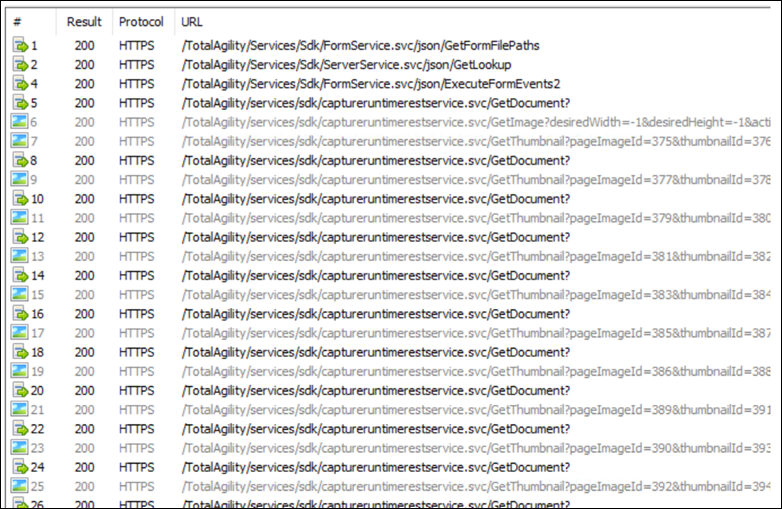
Subsequently, when navigating to another document, only the GetImage() call is made to retrieve the selected document
page.