
Database Utility - Identification Tab
You use this tab to view or edit Tungsten Capture site and workstation information.
Site Information
Displays information about the Tungsten Capture site.
Site GUID
Enter/select the name of the SQL Server to which the Batch Catalog database is to be moved. The drop-down list contains the names of all SQL Server visible to the workstation, except for any server with a name ending in "\Tungsten Capture" (which indicates a standard Tungsten Capture database).
Site name
Lists the current site name, which you can edit. The site name can be from one to 32 characters. You might want to change your site name if, for example, it was incorrectly entered during installation.
Since Tungsten Capture uses the GUID to identify the site, you can change the site name freely. After you change the name, subsequent Tungsten Capture log entries reference the new name.
Site ID
Lists the current Site ID and allows you to change it. The Site ID must be numeric and can range from 1-9999. As with the site name, you can change this freely. After you change the ID, subsequent Tungsten Capture log entries reference the new ID.
- Change button
- Click to save your changes to the Site Name and Site ID.
Station Information
Displays information about the Tungsten Capture workstation.
Station ID
Displays the Station ID, which you can edit. The station ID is used in the Batch Manager module, the error log, and for user tracking. The ID can be from one to 32 characters and may not include the following characters.
Invalid Characters for Station ID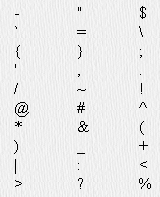
- Change button
- Click to save your changes to the Station ID. The Station ID must be unique within your Tungsten Capture installation.