Process designing interface
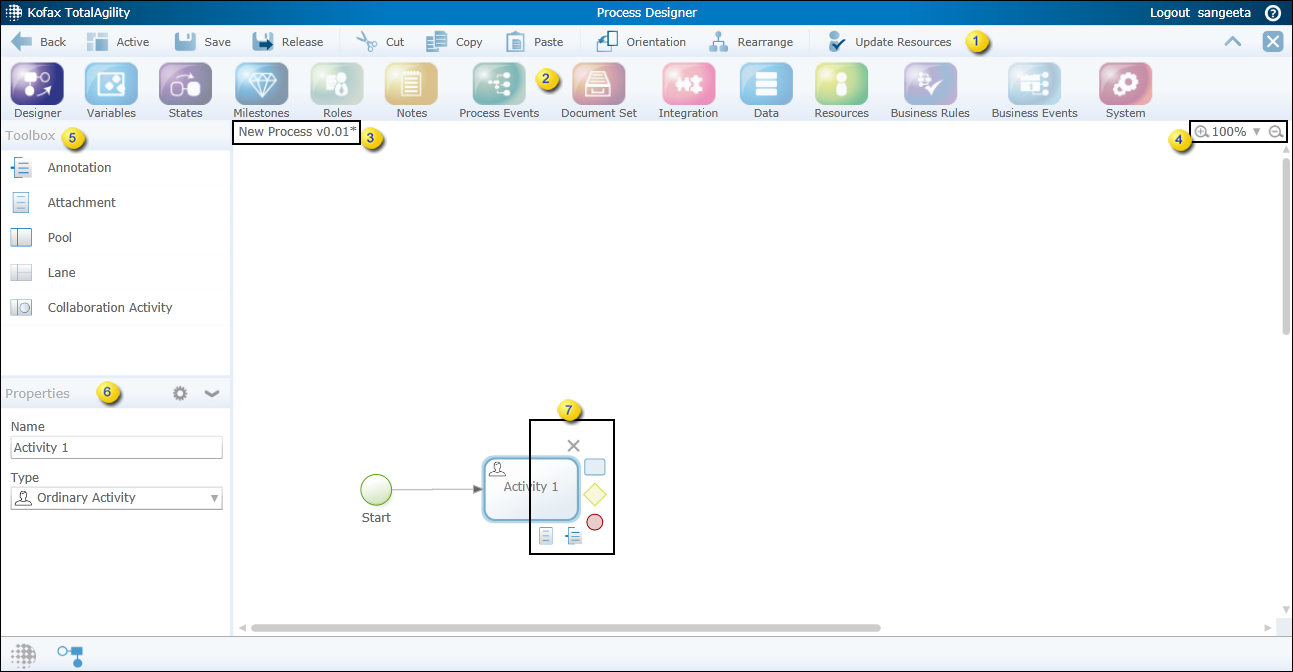
| 1 |
Action Bar |
Displays shortcuts to Process Designer commands. See Action bar buttons. |
| 2 |
Modeling Bar |
Displays the shortcuts for configuring process and case properties. See Modeling bar. |
| 3 |
Displays the process name and version number. The * indicates that the process is new. |
|
| 4 |
Provides zoom options for viewing the process map. |
|
| 5 | Toolbox |
Displays the basic tools for designing processes and cases. See Toolbox. |
| 6 | Properties |
Displays the properties of a process, case or activity,
depending on your selection. Click
Settings
|
| 7 | Satellite |
Displays buttons that appear when you select a node on a process map. See Satellite. |
 on the Properties bar to open the Extended
Properties page where you can configure the selected item.
on the Properties bar to open the Extended
Properties page where you can configure the selected item.