Simulation designing interface
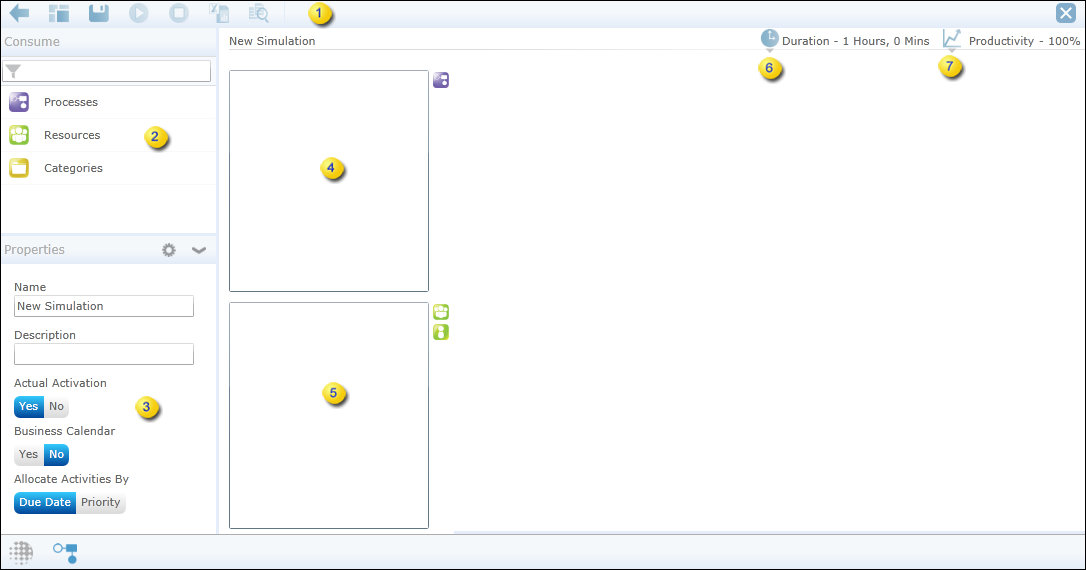
The following table outlines the different components of the simulation designing interface.
| 1 | Action Bar | Displays commonly used simulation commands. See Action bar buttons. |
| 2 | Consume | Lists existing processes, resources and categories. |
| 3 | Properties | Displays the simulation properties. See Create a simulation. |
| 4 | Processes | Consume the required processes for simulation. See Add processes to simulate. |
| 5 | Resources | Consume the required resources to work on simulation. See Add resources to work on simulation. |
| 6 |  Duration Duration
|
Displays the default duration for the simulation to run. Change the duration or set the start and end time if needed. See Create a simulation. |
| 7 |  Productivity Productivity
|
Displays the default productivity to consider for simulation. Change the productivity if needed. See Create a simulation. |