Add a Set Language from Job action
Use the Set Language From Job action to set the form language to the language of the job when a page loads. The language is retrieved from the Job Language property of the job.
Note For a page to display in a different language, resource files for
the translated language must be available in the site; the form must already be
translated. You can use the Translator interface to translate form elements.
See
Translate form elements.
For example, if the language property of a job is set to French,
you can use the property to display a page in French in a form. Configure a Set
Language From Job action so that when the page loads, it is displayed in
French.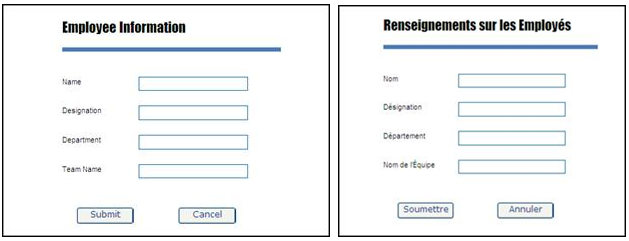
- On the Form Modeling bar, click Actions.
-
On the
Actions page, click
Add
 .
.
- On the Type list, select Set Language From Job.
- Enter a Name and Description for the action.
- Optionally, configure a unique action for each language separately. See Configure multilingual actions for a form or control for more information.
-
In the
Job ID box,
consume the required field or variable.
Note When a new field/variable is dragged to the Job ID box, any existing value is overwritten.
-
Click
OK.
The newly created action is added to the table.
- Click Save.
-
Associate the action with the control to trigger this action. To
call the Set Language from Job action upon form load, associate the action with
the form. See
Associate an action with a form or
control.
When this action is triggered, the form language is set to the language of the job on page load.