
File
This command attaches various types of files to your messages.
When you open the Attach File To window, select a Directory, and then double-click a file entry from the list. The Attach window appears.
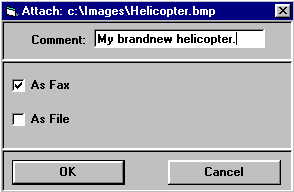
In this window you can convert certain kinds of files to be attached into fax format and/or leave them in their original file format. Text files, on the other hand, can be attached as text and/or as text files.
-
Comment: The contents of this optional field is displayed in the attachment line to help you identify your attachments.
-
As Fax: This check box appears instead of As Text when you attach a file that TCfW can convert internally into a fax image. TCfW recognizes monochrome images in certain formats and converts them during attaching without assistance from other programs.
(For a list of supported file formats see Save Attachment As.)
-
As Text: This check box appears in the window when you select a text file to attach. You can insert it directly in a text box in the message area as text, and/or as a file attachment. When attaching text files as text, you can choose between DOS Text and Windows Text in the drop-down list.
-
As File: For internal sending only. The file is attached as it is. The recipient can open it if he/she has the proper application installed in Windows. In any case, the recipient can use Save Attachment As from the Message menu to retrieve it from the received message.)