
Out of Office
This tab allows you to set options regarding the personal greeting on your extension when you receive a call that you cannot answer.
You can record different greetings for different situations, for instance when you are on vacation or simply not in your office because you are in a meeting. You can also have different greetings for external calls and for internal calls by clicking the Use different settings for internal calls check box.
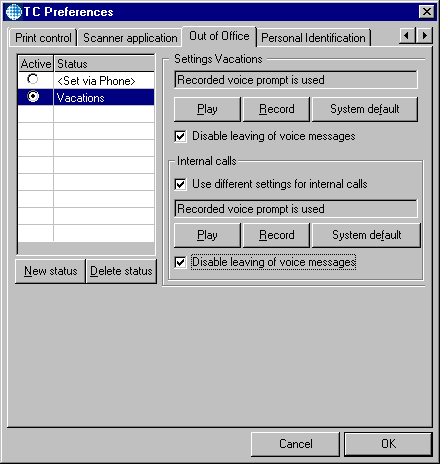
To create a voice prompt for a new status, follow these steps:
- Click the New Status button. The cursor will move to the next empty line in the Status list.
- Enter a name for your new status in this line.
- Click the Record button to record your new voice prompt. The TC Voice Player appears.
- Click the record button in the Player and record your voice prompt.
-
To listen to your prompt you can either click the play button in the TC Voice Player or Play in the Out of Office tab if you have already closed the Player.
To delete a prompt simply click System Default. If you don’t record a new prompt the new status you set will have the default prompt.
To delete a complete status from the list, place the cursor on that status and click the Delete Status button.
If you want to have a different prompt for internal calls than for external calls for one status, check the Use different settings for internal calls check box and record your voice prompt for internal calls by following the steps described above.
If you don’t want callers to leave messages, when you’re on vacation for a long period of time for example, you can check the Disable leaving of voice messages check box.