Scanner
You can insert paper-based documents (hardcopy) into a message by scanning them in. You can either scan in the hardcopy documents with a scanner connected to your workstation, or by using the nearest fax machine as a scanner.
Follow these steps to scan documents with a scanner:
- Make sure your scanner has been set up to work with TCfW.
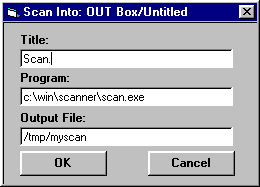
- Click Scan from the Attach menu. The Scan Into window opens.
- Enter a comment in the Comment field (optional).
- Select Start next to Scan With Scanner. The Scan Into window opens.
- Enter a short description of the scanner software in the Title field (optional).
- Enter the DOS path and .EXE file of the program that executes the scanner software in the Program field.
- Enter the DOS path and file name in which you want your scanned document stored in the Output File field.
-
Click
OK.
Follow the required procedures on your scanner to scan the document into your message. The scanned document will automatically appear as an attachment in your message.