
Message Window
The message window consists of a header area and a message area.
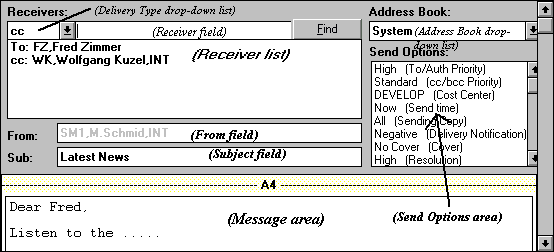
The header area contains recipient and sending information. The message area contains the actual message that can include a cover sheet, text, and various kinds of attachments.
Since Kofax Communication Server supports a variety of sending services, two different displays of messages are possible.
-
Text Mode displays the whole message as text within the message area of the message window, while displaying each attachment as one attachment line only. You create and edit messages in this mode.
-
Image Mode displays the message in WYSIWYG (what you see is what you get) format, including the resolved cover sheet.
Note You can select whether you want the message header to
scroll with the message content when scrolling a long message. Do this in the
TC Management Console (Start
menu/Kofax Communication Server/TC
Management Console). Select
General Settings in the tree
view and check the
Scroll message header with message
content check box.