Handling Word documents
SignDoc Standard supports uploading Microsoft Word documents for signing.
It supports both Office (.docx) and Office 2003 and earlier (.doc) formats.
These Word documents are automatically converted to Portable Document Format (PDF). The PDF file format is more appropriate for digital signatures and archiving.
Microsoft Word signature lines
The MS Office signature lines are recognized by SignDoc Standard and are automatically converted to PDF signature fields.
Microsoft Word signature setup
SignDoc Standard will evaluate the Suggested signer and Suggested signer's e-mail address when trying to assign the PDF signature fields to a recipient.
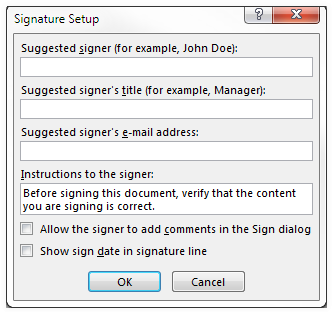
The following cases are possible:
- If the signature line
Suggested signer is not empty and the signature line
Suggested signer's e-mail address is not empty:
SignDoc Standard will look for a match from the list of existing recipients.
If only one recipient with the same name is found the signature field will be assigned to this recipient.
If there are more than one recipients with such a name, the recipient with the same email will be used.
If there are more than one recipients with the same name and email, the recipient with assigned signature fields will be used.
- If the signature line
Suggested signer is not empty and the signature line
Suggested signer's e-mail address is empty:
SignDoc Standard will look for a match from the list of existing recipients.
If only one recipient with the same name is found the signature field will be assigned to this recipient.
If there are more than one recipients with the same name, the recipient with assigned signature fields will be used.
- If the signature line
Suggested signer is empty and the signature line
Suggested signer's e-mail address is not empty:
SignDoc Standard will look for a match from the list of existing recipients.
If there are more than one recipients with the same email, the recipient with assigned signature fields will be used.
- If there is no recipient that matches either the name or email:
A new recipient will be added to the package, using the Suggested signer and Suggested signer's e-mail address from the signature line.
If more than one signature line has the same Suggested signer and Suggested signer's e-mail address these signature fields will all be assigned to the same recipient.