Package settings
On the Package settings page you can update the signing package details.
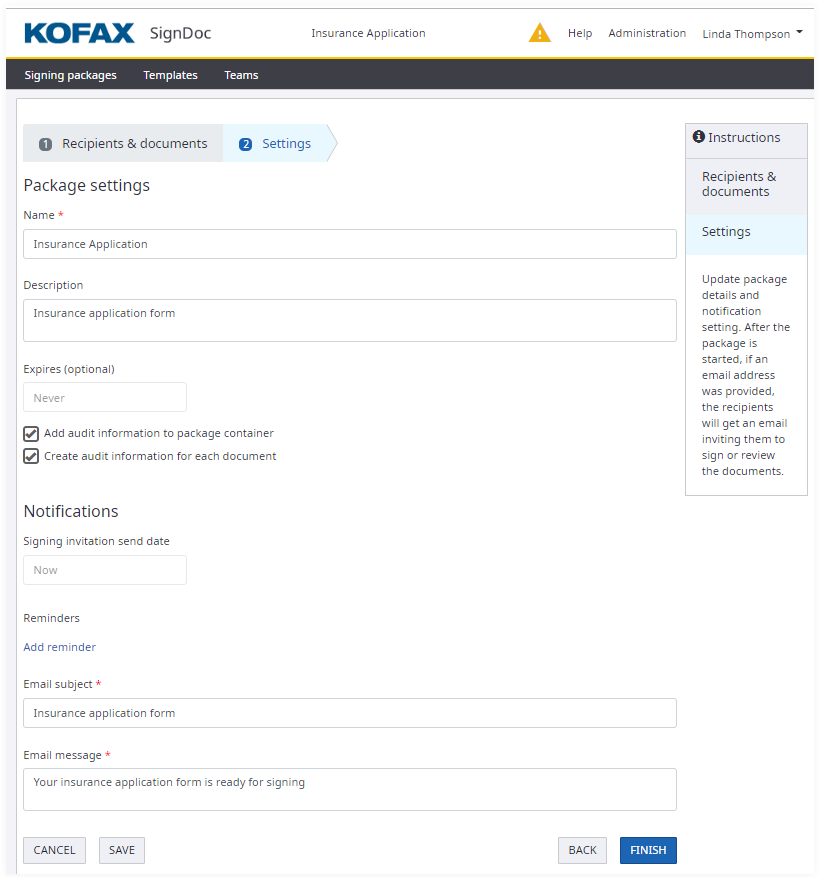
- Name:
- Name of the signing package.
- Description:
- Description for the signing package.
- Expires:
- Define if the signing package expires and become voided if not yet completed.
- Audit trail options:
- Add audit trail information to the signing package container.
- Create audit information for each document.
Note It is recommended not to uncheck these audit trail options.
Notifications
- Signing invitation send date:
- Define when a signing invitation email is sent to recipient(s).
- Add reminders:
- Email reminders are sent to recipients if they haven’t yet completed the signing package.
Note When using series signing routing only the first recipient will get a reminder email if he hasn’t yet completed the signing package.
- Email title:
- The title of the signing invitation email that is sent to receipts.
- Email body:
- Text to include in signing invitation email.
Email fields advanced features
Both Email title and Email body fields have some advanced features:
- You can use $USER placeholder in the fields text to put name of the current user (signing package creator) in the email. For example when setting Email title to ‘$USER invites you to sign the document’, signing package recipients will receive email with subject containing actual user name instead of $USER.
- Auto-filling with the default value. You can clear all existing content in the fields to let application put there a default text from configuration. Note that the application will use default values for the language of the signing package recipients.
Preferred language effect
When recipients in the signing package have a different preferred language, application hides the Email title and Email body fields. This is because the notification messages will have title and content dependent on the recipient language. In this case application shows a message explaining why email fields are hidden.
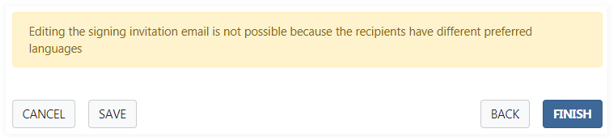
For example, a recipient with French as preferred language will receive a message with French content. An administrator can set up translations for specific languages in the Administration section.
Start a signing package
After the user clicks FINISH the signing package is started.