
How to change the subscription
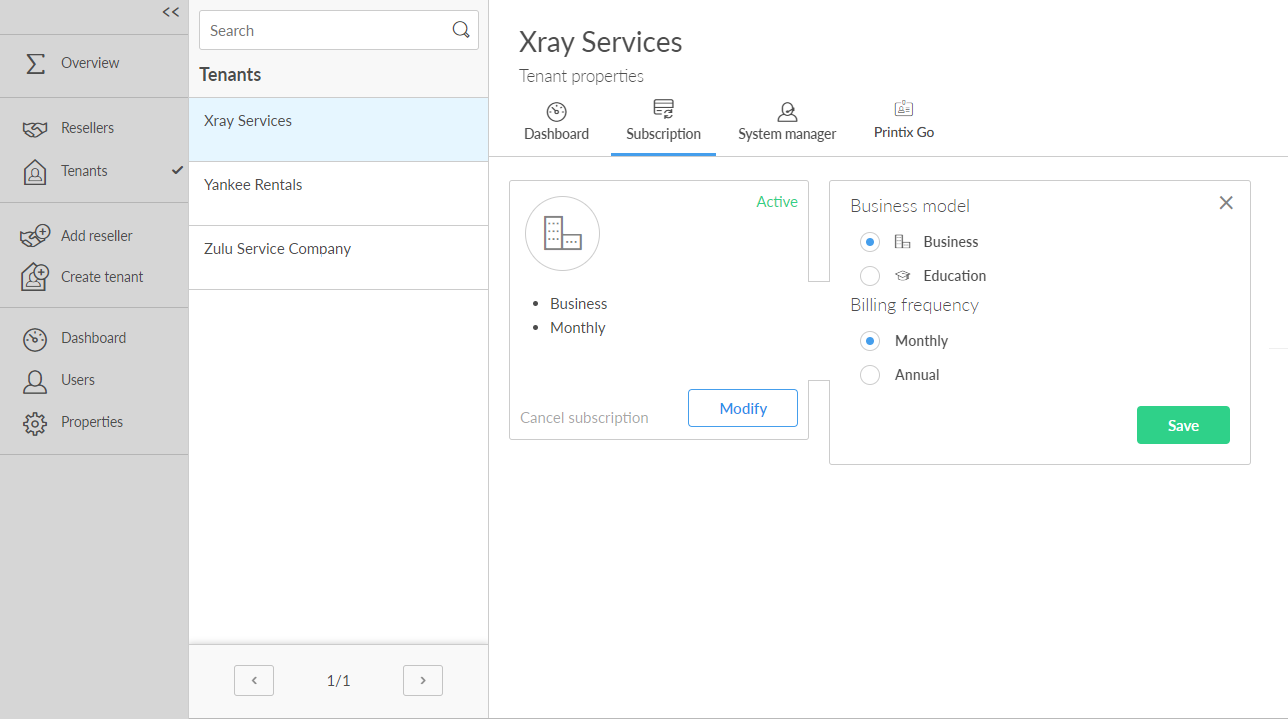
You can change the subscription ONLY if the current plan is Monthly. Otherwise, the Modify button is hidden. In this case, you should contact Product Support about the name of the tenant and what the new plan should be.
- Open the Tenant properties.
-
Select the
Subscription
 tab.
tab.
- Select Modify.
-
Choose the plan you want to change to:
-
Products
-
Printix
-
Power PDF
The Products cannot be changed if the Business model is set to Education.
-
-
Business model
-
Business
-
Education
Education cannot be selected if the Power PDF product is selected.
-
-
Billing frequency
-
Monthly
Monthly is the default setting and the tenant will be added as a line item to the partner's monthly aggregated invoice.
-
Annual
If a customer prefers to purchase with annual upfront payments, the partner can order an annual subscription. The invoice is afterwards distributed to the partner through email.
-
-
Requirements
-
Printix users (Required for a Business+Annual plan)
Enter the number of users to access the Printix service.
-
Power PDF for Windows users (Required for a Business+Annual plan)
Enter the number of users to access the Power PDF service on a Windows computer.
-
Power PDF for Mac users (Required for a Business+Annual plan)
Enter the number of users to access the Power PDF service on a Mac computer.
-
Staff (Required for an Education plan)
Enter the number of administrative staff to access the Printix service. Students are free.
-
-
- Select Save.
Changes to the subscription take effect immediately or after the trial. If the billing frequency is Monthly, it will be reflected on the next invoice. If the change is on an Annual subscription, a new invoice is sent to the financial contact. If subsequent changes need to be made (fewer or more users) to an Annual subscription, contact finance.printix@tungstenautomation.com to have the subscription modified accordingly.