The Export settings dialog
 To
access this dialog:
To
access this dialog:
-
Select > Scan profile management. The Scan profile management dialog is displayed.
-
In the left pane, right-click a scan profile and select Export configuration.
Use these settings to configure an exporter:
|
|
Closes batches automatically when they are complete. Available when using barcodes for batch separation. |
|
|
Select this to activate the remaining settings. |
|
|
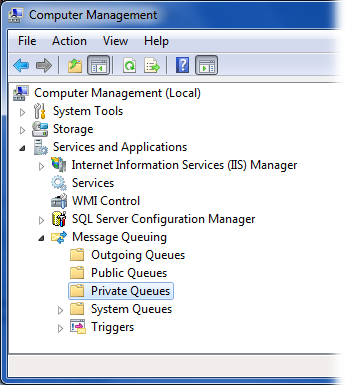
Specify a name for the message source used in Microsoft Message Queue. Two message queues are created for the current user:
You can access these in Windows by selecting > > > . (Show me.) The external program must know the name of the message source, for example via a configuration file. |
|
|
Specify the name of the executable file. If it is not located in the SCAN CLIENT program directory, specify the path, as well. Since this setting is made for each scan profile, you can specify a different exporter for each scan profile, if needed. |
|
|
Specify parameters for the external program. Use semicolons to separate multiple parameters. SCAN CLIENT does not check whether the parameters or their formats are correct. The exporter must be able to interpret the parameters. |
Configuring and using your SCAN CLIENT custom component (add-on)
© 2019 Kofax, Inc. All rights reserved. | Terms of Use