
Set up key business metric
Set up a metric to monitor the number of cases raised daily. If the cases exceed a certain number, launch a process to escalate it. The process can be used to do anything from notifying management, to invoking a review, and more.
Set up a business event: Cases Raised
-
On the
TotalAgility Advanced Studio
Home page, navigate to
and click
New.
The New business event dialog box appears.
- In the Name box, enter Cases Raised as the name of the business event.
- On the Category list, select Incident Management.
-
Provide single metadata by adding the name of the customer.
-
Under
Fields click
.
- In the Name box, enter Customer User Name.
- Leave the Value as Single line of text.
- Click Add.
-
Under
Fields click
.
- Click Save.
Set up a business alert: Large Number of Cases
Set up a business alert to create a process. If more than three cases are raised daily, then TotalAgility creates a job on the process to alert someone that there is an issue.
-
On the
TotalAgility Advanced Studio
Home page, navigate to
and click
New.
The New business alert dialog box appears.
- In the Name box, enter Large Number of Cases.
- On the Category list, select Incident Management.
- On the Create job list, select New to allow TotalAgility to create a new process.
-
Enter
Escalation in Cases as the name of the new process.
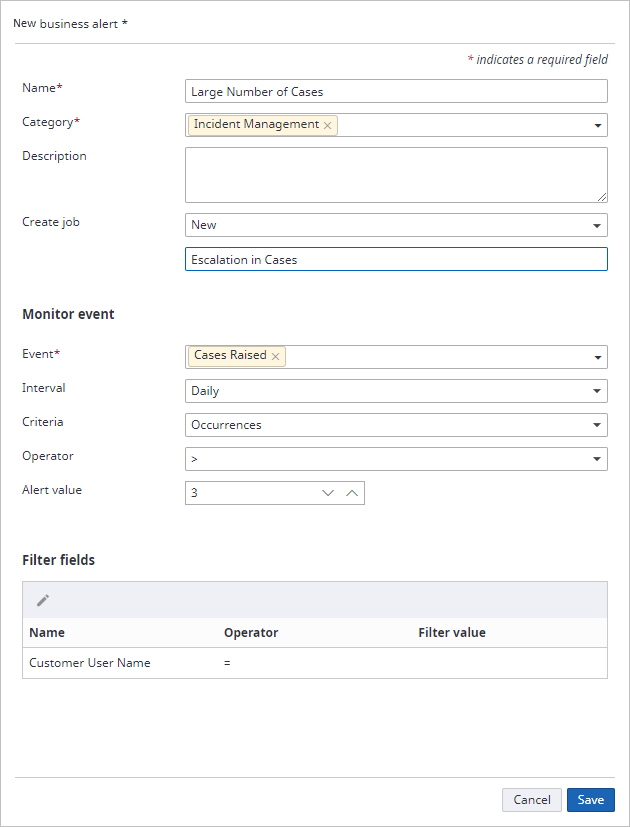
- Click Save.