
Create the instance of a case
Use the generic CreateNewJob form, which is the default form in Tungsten TotalAgility Workspace to create instances of the case.
You can also generate the form to create instances of the case. However, for this option, you need to provide the case reference. Perform the following task to generate a new form.
- On the TotalAgility Advanced Studio menu, navigate to .
-
On the
Generate list, select the
Create new job form to generate.
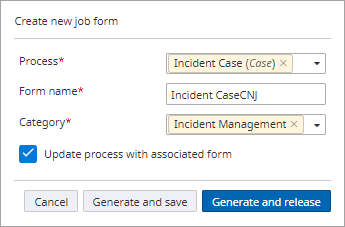
The Create new job form dialog box appears.
- On the Process list, click the Case tab, and then select Incident case.
- In the Form name box, enter a name for the form.
-
On the
Category list, select
Incident Management, and click
Generate and release.
A new form is generated with the specified name.