
Create cases
-
You can either use this default form or create your own.
-
To create cases, you need to set unique case references for each case. In this tutorial, you will create jobs, but not the cases.
-
On the
Tungsten TotalAgility Workspace
home page, click
.
The Create Jobs page appears.
- Select the Job button.
- On the Category list, select Incident Management.
- On the Process list, select Incident Case.
-
Fill in the following details under
Initialization data.
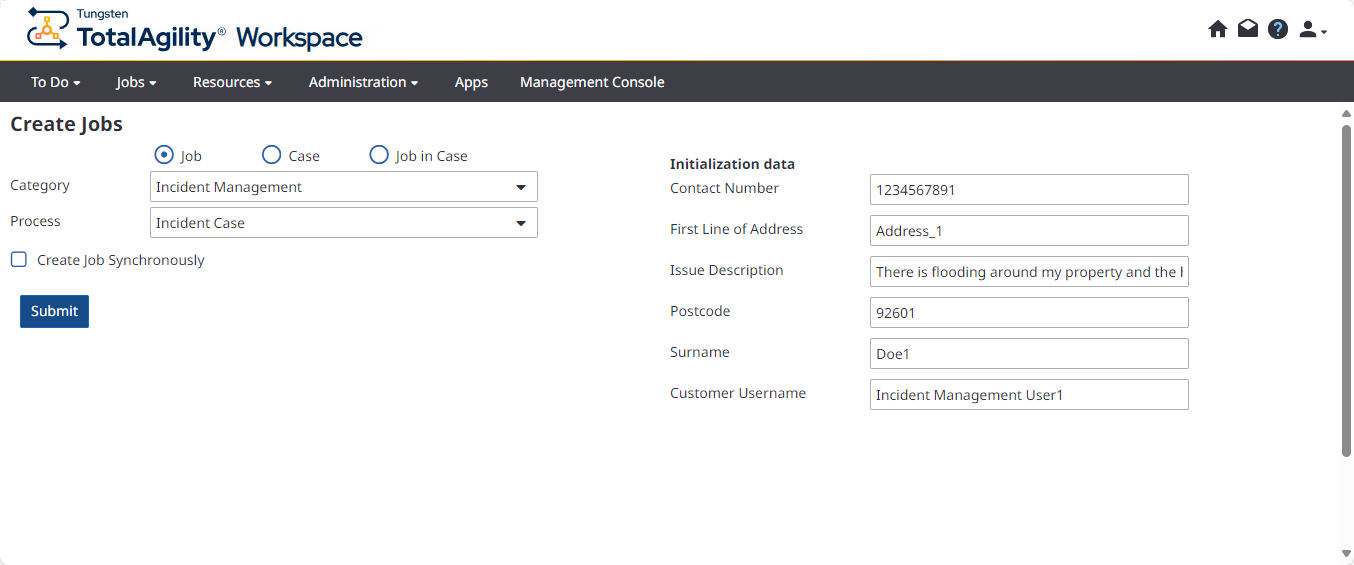
Field Value Contact Number 1234567891 First Line of Address Address_1 Issue Description There is flooding around my property and the house door is broken. Postcode 92601 Surname Doe1 Customer Username Incident Management User1 - Click Submit.
-
Similarly, create three more cases with the details shown below.
Make sure that the postcode is unique for each case and customer username is correct (external users).
Field Value Case2 Case3 Case4 Contact Number 1234567892 1234567893 1234567894 First Line of Address Address_2 Address_3 Address_4 Issue Description There is waterlogging around my house. There is severe flooding around my property. There is waterlogging around my property. Postcode 92602 92603 92604 Surname Doe2 Doe3 Doe4 Customer Username Incident Management User2 Incident Management User3 Incident Management User4