
How to change the advanced settings of a Canon printer
Printix Go must be installed on the Canon printer to access the advanced settings.
-
Open the printer's web page but do not log in yet.
You should see this login screen:
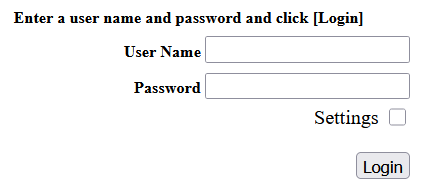
If you see a different login screen, install Printix Go on the printer.
- Enter the User Name and Password of an administrator account but do not select Login yet.
-
Select
Settings, then select
Login.
The advanced settings appear.
-
You can change the following settings:
-
Document Encryption
Encrypt captured documents while they are temporarily stored on the printer's hard disk drive (HDD) before sending them to the workflow destination.
-
Update Device Log
Change the log level of Printix Go on the printer. See How to get logs from Canon printers.
-
Change Password
Change the password on the printer that is effective while Printix Go is installed.
The administrator credentials change to admin/Printix after the installation of Printix Go, and they change back when Printix Go is uninstalled. With this setting, you can only modify the credentials that apply while Printix Go is installed. If you change the password with this setting, the printer remembers it for future installations of Printix Go, and it uses your changed credentials instead of admin/Printix.
-
Clientless
Enable clientless mode on the printer. See How to install clientless Printix Go on a Canon printer.
-
- Select Submit.